| Replacement Laptop Batteries › Replacement MSI Laptop Batteries › Replacement BTY-M492 Battery |
Replacement Laptop Battery Compatible with MSI BTY-M492
For any questions about this product, please email us at order@power-supplier.biz. We strive to respond within 24 hours.
|
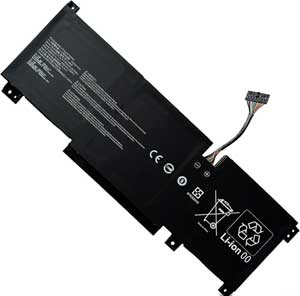
Click to Enlarge
Sale price: GBP 40.55
(VAT included)

|
|
| |
| Battery Type: |
53.5Wh |
| Voltage: |
11.4V |
| Capacity: |
53.5Wh / 4700mAh |
| Package Weight: |
300 g |
| Color: |
Black |
| Condition: |
New |
| Warranty: |
Three years warranty covering manufacturing defects. |
| Shipping: |
Free shipping on all orders |
| Processing Time: |
Same day shipment for orders placed before 3 PM (UTC+8) |
| Money-Back Guarantee: |
Full refund within 30 days if unsatisfied, including the product price and shipping costs. Product must be returned in its original condition |
| Product type: |
Replacement Laptop Battery. Compatible with MSI BTY-M492 |
|
|
This product can replace the following part numbers:
MSI
BTY-M492,
This product is also compatible with the following models:
MSI
Bravo 15 B5DD-271KH, Katana GF76 11UE, Bravo 15 B5DD-010US,
Katana GF66 11UD, Sword 17 A11UD, Bravo 15 B5DD-273PH,
Pulse GL76 12UEK, Bravo 15 B5DD-098, Katana GF66 12UGS,
Bravo 15 B5DD, Bravo 15-B5DD-076KH, Sword 17 A11SC,
Bravo 15 B5DD-272PH, Katana GF76 12UD, Bravo 15 B5DD-085,
Katana GF66 12UG, Bravo 15 B5DD-295, Sword 15 A12UG,
|
|
Choosing the right Charger / AC adapter:Before you buy any AC laptop adapter, please make sure the AC laptop adapter will give you the correct voltage and suitable current output.
|
How to Maximize Battery Performance?
To maximize battery performance, follow these tips:
-
Initial Conditioning: For new batteries, fully charge and discharge them a few times to reach maximum rated capacity.
-
Regular Use: Use the battery at least once a month, even if stored in a cool, dry place.
-
Clean Contacts: Clean the metal connectors (gold or silver contacts) with alcohol or electronics cleaner to maintain good conductivity.
-
Optimize Power Settings: Adjust power management settings in the system BIOS and operating system to improve battery performance. Consult your user manual for details.
Is There Any Danger in Leaving a Laptop on 24 Hours a Day?
Yes, as long as it is placed in a well-ventilated area. The main risk for laptops is overheating due to their compact design. To prevent overheating:
-
Ensure proper ventilation by placing the laptop on a hard, flat surface.
-
Avoid using the laptop on insulating materials like blankets or beds.
-
Consider using a laptop cooling pad for extended use.
Modern laptops have built-in overheating protection, but proper ventilation is still essential.
Disclaimer
All trademarks, logos, and brand names are the property of their respective owners. Power-Supplier.biz is an independent supplier of aftermarket products and is not affiliated with, authorized by, or endorsed by any original equipment manufacturer (OEM). Our products are designed to be compatible with certain OEM devices/systems, but they are not OEM-original, genuine, or certified by the manufacturer. |
| |