| Replacement Laptop Batteries › Replacement IBM Laptop Batteries › Replacement Thinkpad I1321 Battery |
Replacement Laptop Battery Compatible with IBM Thinkpad I1321
For any questions about this product, please email us at order@power-supplier.biz. We strive to respond within 24 hours.
|
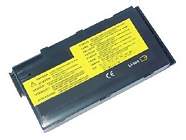
Click to Enlarge
Sale price: SGD 43.69
(GST included)

|
|
| coming soon |
| Battery Type: |
Li-ion |
| Voltage: |
14.4V |
| Capacity: |
3600mAh |
| Dimension: |
156.20x75.20x20.20mm |
| Color: |
black |
| Condition: |
New |
| Warranty: |
Three years warranty covering manufacturing defects. |
| Shipping: |
Free shipping on all orders |
| Processing Time: |
Same day shipment for orders placed before 3 PM (UTC+8) |
| Money-Back Guarantee: |
Full refund within 30 days if unsatisfied, including the product price and shipping costs. Product must be returned in its original condition |
| Product type: |
Replacement Laptop Battery. Compatible with IBM Thinkpad I1321 |
|
|
This Laptop Battery can replace the following part numbers:
IBM
02K6732, 02K6730, 02K6729,
02K6728, 02K6873, FRU02K6729,
This Laptop Battery is also compatible with the following models:
IBM
Thinkpad I1211, Thinkpad I1361, ThinkPad I 1300 Series,
Thinkpad I1321, Thinkpad I1251, Thinkpad I1310,
Thinkpad I1210, Thinkpad I1351, ThinkPad I 1200 Series,
Thinkpad I1300, Thinkpad I1241, Thinkpad I1391,
Thinkpad I1200, Thinkpad I1340, Thinkpad I1271,
|
|
Choosing the right Charger / AC adapter:Before you buy any AC laptop adapter, please make sure the AC laptop adapter will give you the correct voltage and suitable current output.
|
| See our tips for Extending Your Laptops Battery Life |
How to Maximize Battery Performance?
To maximize battery performance, follow these tips:
-
Initial Conditioning: For new batteries, fully charge and discharge them a few times to reach maximum rated capacity.
-
Regular Use: Use the battery at least once a month, even if stored in a cool, dry place.
-
Clean Contacts: Clean the metal connectors (gold or silver contacts) with alcohol or electronics cleaner to maintain good conductivity.
-
Optimize Power Settings: Adjust power management settings in the system BIOS and operating system to improve battery performance. Consult your user manual for details.
Is There Any Danger in Leaving a Laptop on 24 Hours a Day?
Yes, as long as it is placed in a well-ventilated area. The main risk for laptops is overheating due to their compact design. To prevent overheating:
-
Ensure proper ventilation by placing the laptop on a hard, flat surface.
-
Avoid using the laptop on insulating materials like blankets or beds.
-
Consider using a laptop cooling pad for extended use.
Modern laptops have built-in overheating protection, but proper ventilation is still essential.
Disclaimer
All trademarks, logos, and brand names are the property of their respective owners. Power-Supplier.biz is an independent supplier of aftermarket products and is not affiliated with, authorized by, or endorsed by any original equipment manufacturer (OEM). Our products are designed to be compatible with certain OEM devices/systems, but they are not OEM-original, genuine, or certified by the manufacturer. |
| |